
Carbon IQ
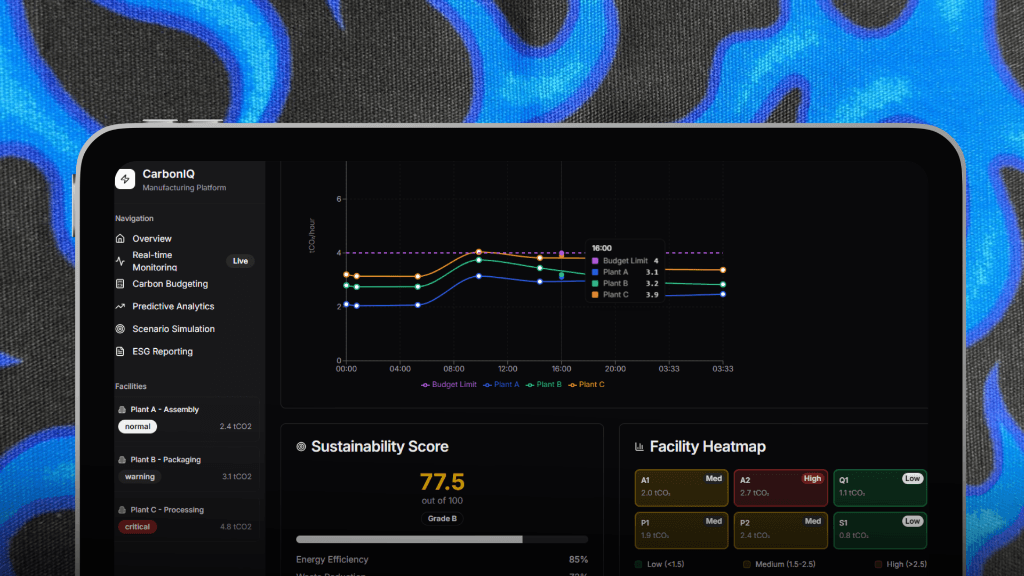
A sleek manufacturing dashboard prototype for carbon monitoring—built purely for fun using Vercel v0 to explore modern UI/UX patterns.
Timeline
2 Days
Role
Frontend Developer
Team
Solo
Status
CompletedTechnology Stack
Carbon IQ
Overview
Carbon IQ is a frontend prototype I built purely for fun using Vercel v0. It's a manufacturing dashboard concept for real-time carbon monitoring—but honestly, it's just the UI. No backend, no real data, just a sleek interface to explore modern design patterns and practice with data visualization libraries.
Sometimes you just want to build something that looks cool without worrying about the backend complexity, and that's exactly what this was.
Why I Built This
I wanted to experiment with:
- Vercel v0: The AI-powered UI generation tool that lets you vibe-code interfaces
- Data visualization: Practice with Recharts and Tremor UI for dashboard design
- Dark mode aesthetics: Create a modern, control-room-style interface
- Quick prototyping: See how fast I could go from idea to polished UI
There's no grand vision here—just a fun weekend project to sharpen my frontend skills and explore new tools.
What's Inside
Real-time Monitoring (Simulated)
The dashboard shows "live" carbon emission data from Assembly, Packaging, and Processing plants. Of course, it's all mock data, but it looks convincing enough!
Predictive Analytics Charts
Beautiful line graphs showing emission trends over time. The data is hardcoded, but the charts are fully interactive with hover effects and smooth animations.
Sustainability Scoring
A calculated metric (out of 100) that gives a quick "health check" of the facility's ESG performance. Again, fake data, but the UI pattern is solid.
Facility Heatmap
A visual representation of emission intensity across different sectors. This was the most fun to build—playing with color gradients and hover states.
Design Philosophy
I went all-in on the dark-themed, control-room aesthetic:
- High-contrast charts for immediate readability
- Color-coded status indicators (Normal, Warning, Critical)
- Glassmorphism effects and subtle gradients
- Smooth transitions and micro-animations
The goal was to make it look like something you'd see in a real manufacturing control center—even if it's just a frontend shell.
Tech Stack
- Next.js: For the React framework and routing
- TypeScript: Type safety for component props and data structures
- Tailwind CSS: Rapid styling with utility classes
- Recharts: Interactive charts and graphs
- Tremor UI: Pre-built dashboard components
- Vercel v0: AI-assisted UI generation and rapid prototyping
What I Learned
Even though this was just a fun project, I picked up some useful skills:
- Vercel v0 workflow: How to use AI to speed up UI development
- Dashboard design patterns: Layout, color coding, and data hierarchy
- Chart libraries: Deep dive into Recharts configuration and customization
- Mock data structuring: Creating realistic-looking fake data for prototypes
The Reality Check
Let's be honest—this is frontend only. There's:
- ❌ No backend
- ❌ No real data sources
- ❌ No API integration
- ❌ No authentication
- ❌ No database
It's purely a visual prototype. But sometimes that's all you need to explore an idea or practice your design skills.
Why Share This?
Because not every project needs to be a full-stack masterpiece. Sometimes you just build something for fun, learn a few things, and move on. This was one of those projects—a quick, enjoyable exploration of modern dashboard design.
Plus, it looks pretty cool. 😎